When performance loses users (opens in a new tab)
Cisco App Attention Index · 2023 consumer survey
Among more than 15,000 consumers surveyed, 77% said they had abandoned or deleted an app following performance problems in the preceding year.
For solo developers
Go beyond checking whether a feature works. Consider the quality your users depend on, discover established testing techniques and keep testing priorities in step with new features. Builder brings that testing strategy into your AI coding workflow.
For independent developers and technical founders building business software. Builder is for one business user; company details are required.
Getting a feature to work is one part of building software people can trust. RiskRover helps you take a broader view of quality and discover professional testing approaches you may not have used before.
Explore them in the app and turn that knowledge into a testing strategy for your own product.
Performance is one part of quality, with evidence linking it to retention and sales. These external findings explain the stakes; they are not RiskRover results or a forecast for your product.
Cisco App Attention Index · 2023 consumer survey
Among more than 15,000 consumers surveyed, 77% said they had abandoned or deleted an app following performance problems in the preceding year.
Vodafone · 2021 landing-page A/B test
Vodafone reported 8% more sales from a variant with a 31% improvement in Largest Contentful Paint, a loading-speed measure. The A/B test compared otherwise matching pages.
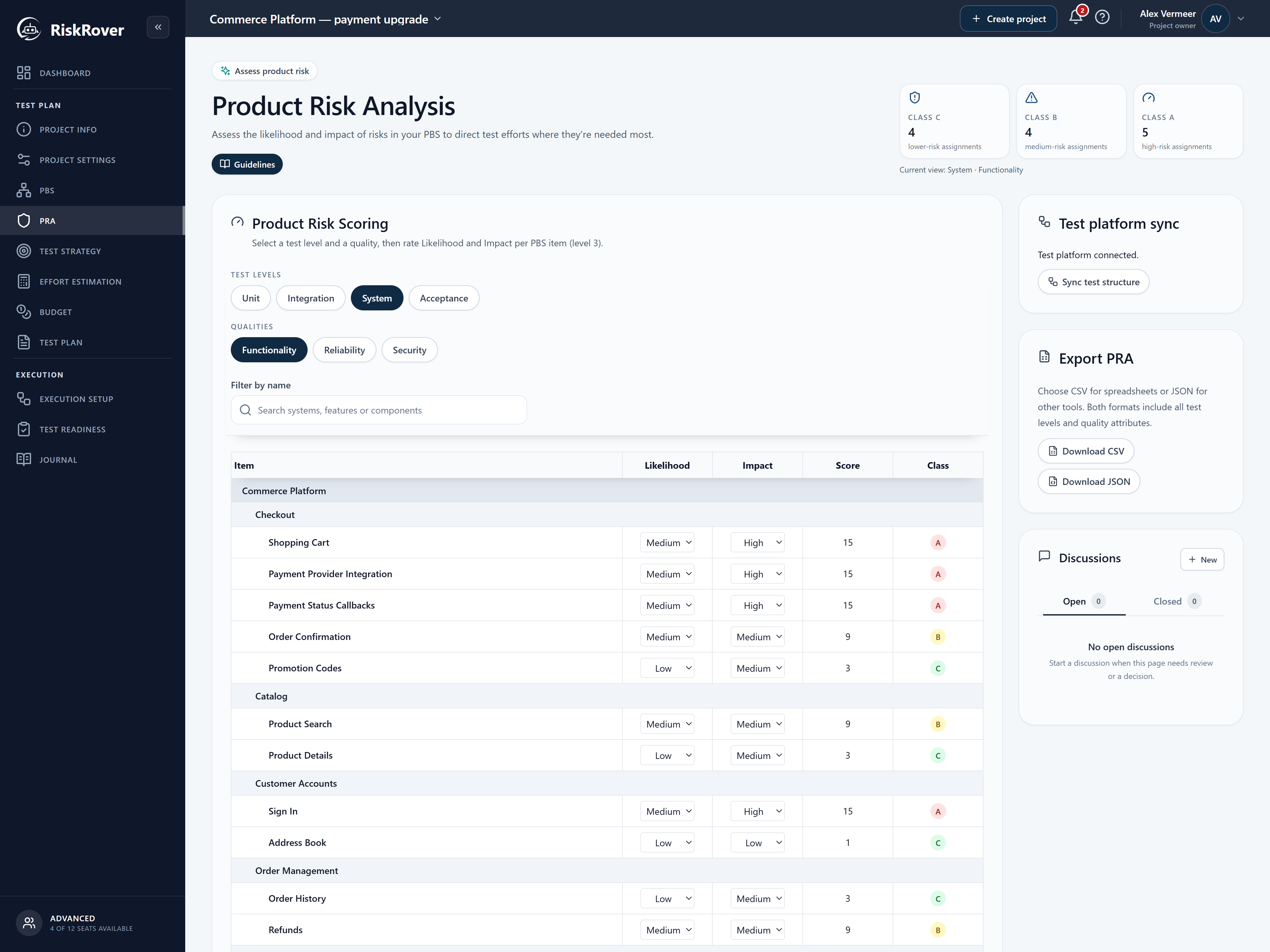
A fictional Checkout payment upgrade shows how a broad concern becomes a focused testing priority. The prompts are illustrative, with real saved application data shown in the page introduction. This is not a recorded AI conversation or evidence that tests ran.
A new payment provider changes a business-critical flow.
Example prompt: “Review payment functionality against the tests in my selected workspace, including retries and duplicate callbacks. Explain the gaps and propose planning changes. Do not save yet.”
OutputPotential gaps to investigate, with missing tests kept distinct from observed failures.
A failed or duplicate payment could block an order or charge a customer incorrectly.
In this example, likelihood 3 and impact 5 give a risk score of 15, Class A. Review the business assumptions and proposed Deep testing before approving the exact update. These are planning judgements, not measured failure probabilities.
OutputA reviewed priority and testing depth attached to the payment component.
Verify the saved strategy, then ask your assistant to propose checks for payment retries and duplicate callbacks. Your AI client supplies any authorised code inspection and test execution.
OutputA focused next testing task, grounded in the risk and strategy you reviewed.
A growing product needs a testing strategy that can grow with it. Keep your next testing decision connected to what you are building now.
Extend your project scope with the next feature and the areas it affects.
Review how the change affects the risks your testing needs to address.
Ask your assistant to reassess available test coverage against the updated scope.
Prioritize gaps by risk, review strategy updates and keep the decisions for your next release.
Pricing
The quality and test-technique planning workflow is included in Free. Builder adds MCP access for one user, so your assistant can use that context and propose changes for you to review. Choose Pro for execution, exports, collaboration or integrations.
Free is for one person, with no company details, VAT number or credit card required. Paid plans are for business use. What you need to start
Prices exclude VAT. The applicable B2B VAT treatment is confirmed before Checkout.
For getting started
Build a clear test plan for your project, at your own pace.
For building with AI
Give your AI coding assistant the product context to focus your testing.
Same planning and project limits as Free.
For teams and connected workflows
Bring people, planning and test execution together in one workspace.
For 1–50 users. Billed per user.
You can start with the eight-step planning workflow and built-in technique catalogue, then adapt them to your product. RiskRover provides structure for your decisions; it does not certify product quality or guarantee complete coverage. You still decide what matters and verify it through testing.
Create a project and configure its test levels in RiskRover. Install the VS Code extension below, run Sign In and choose Copilot or Codex. Select your project and permissions in the browser, then start a new agent session. Review proposed changes before saving and verify the result in RiskRover.
Builder and Pro subscriptions are for business use. Activation requires company details and applicable VAT verification, including for a one-person business. See Free on the pricing page for individual planning, or explore the public examples and guides.
RiskRover MCP supplies planning and risk context. It does not read your repository, create tests or run commands. Your selected AI client can inspect the workspace and perform work you authorise under its own permissions.
With read-only access it can assess risks and draft scope. Read-and-reviewed-write access supports approved product breakdown, Component quality, risk, strategy, estimation, role and allocation updates. Set up project information and test levels in the app; review each proposed change before saving.
The VS Code extension supports GitHub Copilot and Codex through browser sign-in. Other MCP clients can use a restricted MCP-purpose token. You need access to a compatible AI client separately. Builder includes one user and the same planning and project limits as Free; Pro also includes MCP.
Give your AI assistant a testing strategy that considers more than the obvious checks. Explore Builder, or start shaping that strategy with Free.
With your permission, Google Analytics helps us understand how this website is used. You can decline and use the site normally. Change your choice any time in the footer.